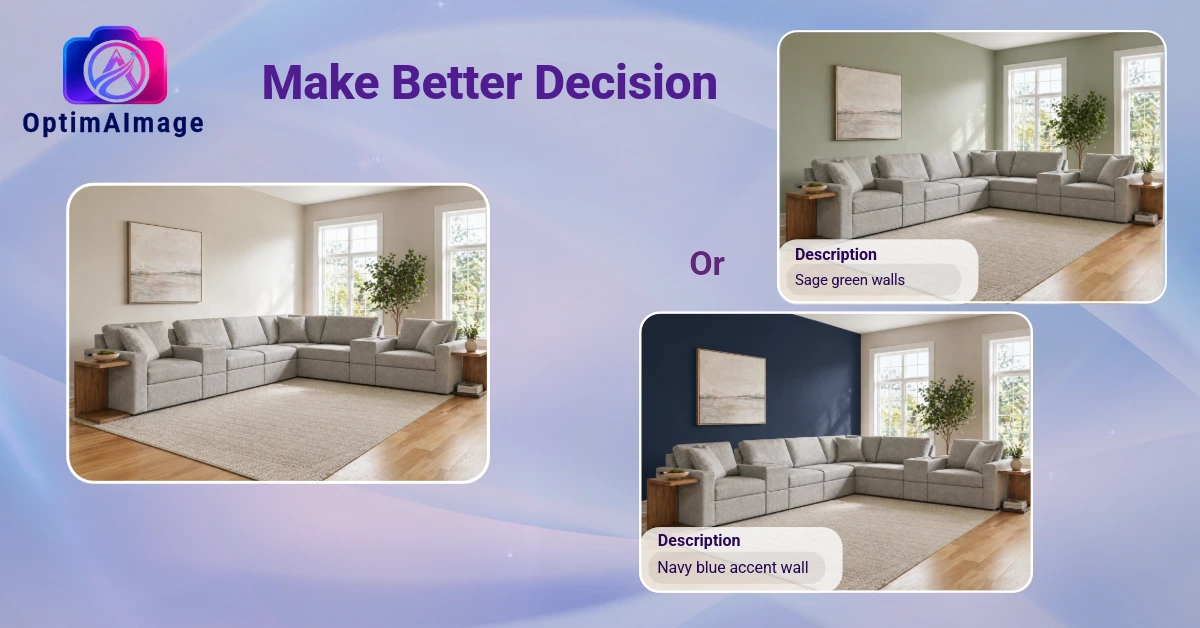
Paint is the fastest, cheapest way to transform a room. It's also the renovation homeowners get wrong most often.
You pull a dozen swatches from the hardware store, hold them against the wall, squint in different lighting, and pick the one that looks best. Then you paint the room and realize the greige you loved on the chip reads pink under lamplight, or the crisp white you chose looks yellow next to your trim. Now you're living in a color you don't love, or you're paying someone to redo it.
A room paint visualizer eliminates that guesswork. Upload a photo of your actual room, describe the color you want, and see a photorealistic render of what that color looks like on your walls — in your space, with your furniture and lighting — before you spend anything on paint.
Why Paint Samples Are Not Enough
The problem with paint chips and sample pots isn't that they're inaccurate — it's that they can't account for context. A 4-inch swatch on a white showroom card tells you nothing about how a color will behave across 300 square feet of wall, flanked by your warm-toned hardwood floors and competing with south-facing windows.
Paint color perception changes with:
- Light direction and intensity — north-facing rooms read colors cooler; south-facing rooms intensify warm tones
- Adjacent colors — your sofa, rug, and trim all shift the perceived temperature of any wall color
- Surface area — colors always read darker and more saturated on large wall surfaces than on a small chip
- Finish — matte, eggshell, and satin reflect light differently, which changes how the color reads across the day
The only way to really know how a color will look is to see it in the actual room. That's exactly what a room paint visualizer gives you.
What You Can Visualize — Room by Room
Living rooms are where paint visualization pays off most. It's the first room guests see, the hardest to redo mid-project, and the space where color choices carry the most emotional weight. With a visualizer, you can test a bold accent wall, preview all four walls in a deep moody color, or compare three neutrals side by side — all from a single photo of your room.
Bedrooms present a different challenge. Colors that feel calming in a showroom can read cold or clinical in a north-facing bedroom at night. Soft blues and greens that look serene on a chip sometimes shift cool under artificial light. A bedroom paint visualizer shows you what the color actually does in your room, under your lamp, before you commit.
Kitchens and bathrooms are high-contrast spaces where paint interacts with cabinetry, tile, hardware, and fixtures. Warm paint can make wood cabinets glow or look muddy depending on undertones. Cool paint can make stainless appliances crisp or institutional. The margin for error is small because the visual complexity is high — seeing it first is essential.
Exterior paint is where the stakes are highest. A full exterior repaint runs $3,000–$10,000 on average, and you cannot undo it quickly. A paint house visualizer lets you test siding color, trim, shutters, and the front door on a photo of your actual home before you hire anyone. Given the cost and visibility, seeing it before you start is non-negotiable.
How the Room Paint Visualizer Works in OptimAImage
OptimAImage is built around one idea: you should see a change before you commit to it. The room paint visualizer is the most direct version of that.
Here's the workflow:
- Upload a photo of your room — any photo taken on a phone works; natural daylight gives the most accurate color results
- Describe the paint change — "warm sage green on all four walls," "Benjamin Moore Hale Navy with white trim," or just "something moody and dark"
- AI Agent optimization — OptimAImage's AI Agent translates your description into a precise prompt that accounts for finish, saturation, and how the color behaves in light
- Multi-model generation — multiple AI models each produce a result; the most photorealistic one is returned to you
- Review and iterate — comparing three colors means generating three renders; it's easy to try options before you decide
The photo editor also lets you draw on specific walls, so you can visualize just an accent wall without changing the rest of the room.
Tips for Getting Accurate Results
Photograph in daylight. The most accurate color renders come from photos taken with natural light. Open the curtains and turn off artificial lighting before you shoot.
Capture the full wall. A photo that shows the wall from corner to corner gives the AI the spatial context it needs to apply color accurately across the surface.
Specify the finish. "Matte sage green" and "satin sage green" look noticeably different in person — and in a render. Include the finish you're considering and you'll get a more precise preview.
Try the unexpected. The main reason people default to safe colors is they can't visualize what a bold choice would actually look like. With a paint visualizer it's risk-free to try the dark moody green or the deep terracotta. You might be surprised how much you love it.
Include the trim. Trim color has a bigger effect on perceived room color than most people expect. Test your wall color with crisp white trim, then with warm off-white trim, and compare — the same wall color reads entirely differently depending on what's beside it.
Beyond Paint: The Full Room Redesign
Once you've locked in a paint color, the room usually tells you what else needs to change. The sofa that worked with beige walls looks off against sage green. The rug that tied everything together now competes with the new color.
That's where the full room visualization comes in. The same photo you used for paint can show you new furniture, updated flooring, different fixtures, or a complete style overhaul — building on the paint color you've already chosen. You can make one change at a time or reimagine the entire space; the tools work together either way.
Getting Started
Paint decisions are personal, and the stakes are real enough that guessing doesn't make sense when you can see the answer instead. The room paint visualizer removes the uncertainty that makes color choices stressful.
OptimAImage can help — see our pricing to find the right plan for your needs. Upload a photo of any room today, test the color you've been considering, and know before you buy.