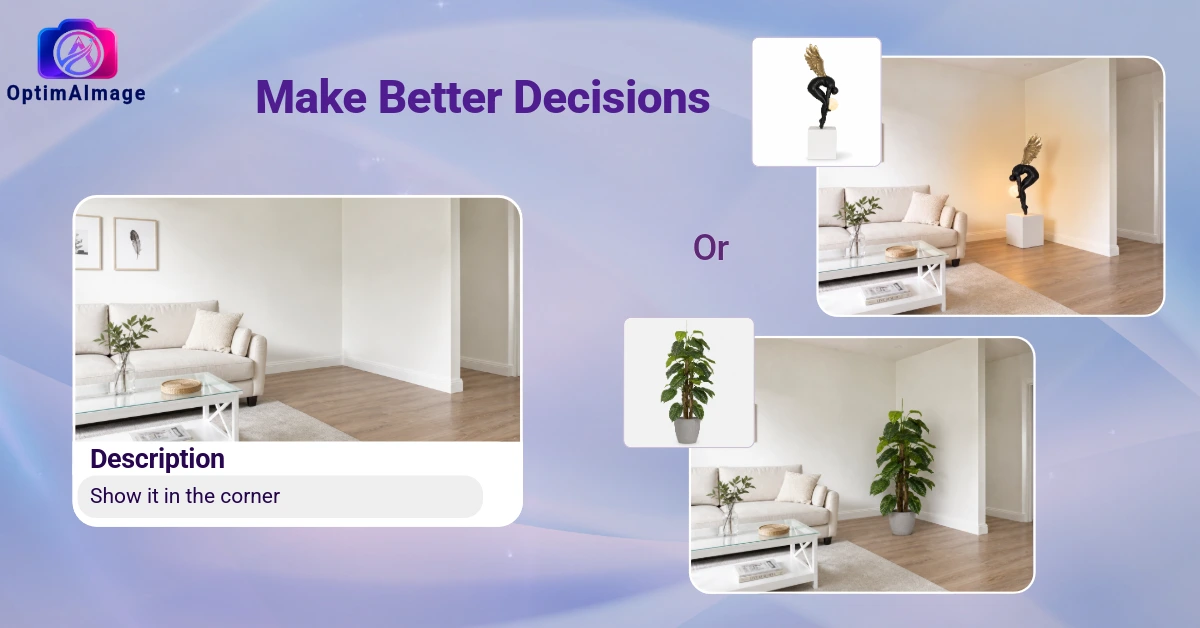
Most people live in rooms they settled for. Not rooms they hate — just rooms that never quite became what they imagined when they moved in. The furniture is fine. The paint is inoffensive. But nothing feels intentional, and the vision they had in their head never quite made it to the wall.
The gap between what you imagine and what you get has always come down to one thing: you can't see the future. You can't know whether that sofa works in your living room until it's delivered and it doesn't. You can't know whether the bold wallpaper you love on Pinterest will feel claustrophobic in your actual bedroom until it's on all four walls and the paste is dry.
AI home design tools change this. You upload a photo of your real room, describe what you want, and see a photorealistic render of your actual space redesigned — before you buy anything.
What AI Home Design Can Change
The best AI home decoration tools aren't limited to one type of change. They handle the full range of what makes a room feel like itself:
Furniture — Place a new sofa, swap out a dining table, add a media console, or completely furnish an empty room. See scale and proportion in your actual space before you order.
Color — Wall paint, accent walls, furniture upholstery, and even cabinetry colors. Test a dozen color combinations on your real room in the time it would take you to drive to the paint store.
Style overhauls — Want to go from builder-grade to Scandinavian? From cluttered traditional to clean modern farmhouse? AI room decorators can reimagine the entire aesthetic of a space while keeping the bones of your room — the layout, windows, and dimensions — exactly as they are.
Flooring — Hardwood, tile, patterned rugs, LVP. See how the same room reads with light oak versus dark walnut versus polished concrete before you pull up a single plank.
Lighting and fixtures — Swap the ceiling fan for a statement pendant. Add floor lamps to define a reading corner. Changing the light fixtures in a room changes everything about how it feels, and now you can preview it first.
Exterior curb appeal — AI home design works outside too. Visualize new siding colors, updated landscaping, porch furniture, or a complete exterior refresh on a photo of your actual house.
What Makes AI Home Design Different From Just Using Google Images
Searching Pinterest or Google Images for "living room inspiration" gives you beautiful photos of rooms that have nothing to do with yours. The proportions are different. The windows are in different places. The light behaves differently. And the furniture in the photo might not fit through your door.
An AI home design tool works differently. It uses your photo as the anchor. Your walls stay where they are. Your window doesn't migrate to the other side of the room. The ceiling height in the render matches your ceiling height. The proportions of every change are calibrated to your actual space.
That's the difference between inspiration and visualization. Inspiration shows you what's possible somewhere. Visualization shows you what's possible here — in your room, with your dimensions, in your light.
Who Benefits Most from AI Home Decoration
Homeowners planning a renovation — Before you commit $20,000 to a kitchen remodel or a primary bedroom refresh, run every variation of the design through an AI home design tool. See the dark navy cabinets versus the white shaker cabinets. See the marble countertop versus the honed quartz. Make the expensive decisions with visual confidence.
Renters who want to personalize their space — You can't knock down walls or repaint without permission, but you can visualize new furniture arrangements, rugs, curtains, and decor that work within the constraints you have. See the result before you buy.
People selling their home — Deciding which improvements are worth making before listing is hard when you're trying to guess what buyers will respond to. Use an AI home decor tool to visualize the staging options, identify the highest-impact changes, and present the space at its best.
First-time homeowners — Moving into a new home is overwhelming. Every room needs decisions, and the stakes feel high when everything is unfamiliar. AI home design lets you explore styles, test furniture layouts, and develop your taste before committing to purchases you'll live with for years.
Anyone who's been staring at the same room too long — Sometimes you know a room is wrong and you just can't see how to fix it. An AI room decorator can show you five completely different versions of the same space and break the mental block.
How OptimAImage Approaches AI Home Design
OptimAImage is built specifically for room transformation — taking your photo and returning a photorealistic redesign that respects your space's actual dimensions and structure.
The workflow is straightforward:
- Upload your room photo — a photo from your phone is fine; natural light gives the best results
- Describe what you want — "Japandi-style living room with warm neutrals and natural wood furniture" or "same layout but with a modern coastal vibe and lighter colors"
- AI Agent expansion — OptimAImage's AI Agent turns your plain-language description into a detailed technical prompt optimized for photorealistic results
- Multi-model competition — four AI models (Gemini, ChatGPT (GPT Image), Nano Banana 1, Nano Banana 2 Pro) each generate a result; the most accurate and photorealistic is returned to you
- Selective editing — use the draw-to-edit tool to target specific areas for changes without regenerating the whole room
One thing worth noting: you're not limited to one iteration. The best approach to AI home home design is to generate options, compare them, and iterate — try the Scandinavian version and the mid-century version of the same room side by side before deciding which direction to take.
Getting the Most from Your AI Home Design Session
Start with the biggest problem. Most rooms have one thing that's clearly wrong — an awkward sofa, a bad paint color, an empty wall. Start there and let the AI show you options before you move on to finer details.
Use reference images when you have a specific direction. If you've saved a photo of a room style you love, you can reference it in your description: "white kitchen in the style of the reference image, applied to my actual kitchen." The AI uses that visual context to align the output with your taste.
Don't stop at one generation. The first result isn't always the best result. Generate three or four variations of the same room — different color temperatures, different furniture arrangements — and pick the elements you want to combine.
Work room by room. AI home design is most powerful when you're making one space great at a time, not trying to plan an entire house at once. The living room first, then the bedroom, then wherever the next-biggest decision lives.
Getting Started
Your home should look like you meant it to. Not like a series of okay decisions made under uncertainty. AI home design tools remove the uncertainty so you can make decisions with confidence.
OptimAImage can help you realize your vision. Check our pricing to find the right plan for your needs. Upload a photo of any room and see your vision realized before you spend a dollar making it real.