There's no shortage of apps that promise to redesign your home with AI. Some of them work. Many of them generate a beautiful room that has almost nothing to do with your actual space — wrong proportions, different windows, furniture that would never fit through your front door.
The gap between a genuinely useful AI interior design app and a glorified image generator is significant. Knowing what to look for — and what red flags to avoid — saves you the frustration of trying four apps before you find one that actually does what you want.
This guide breaks down what makes an AI interior design app worth using, the features that matter for real home renovation decisions, and how to get results you can actually act on.
The Core Problem: Most AI Tools Don't Know What Your Room Looks Like
When you type "redesign my bedroom in a modern Scandinavian style" into a general AI chatbot, it will generate a beautiful image. The image will have nothing to do with your bedroom.
General-purpose AI image generators create scenes from text descriptions. They imagine what a Scandinavian bedroom could look like. They have no idea what your bedroom actually looks like — the window placement, the room proportions, the existing built-ins, the angle of natural light at 9am.
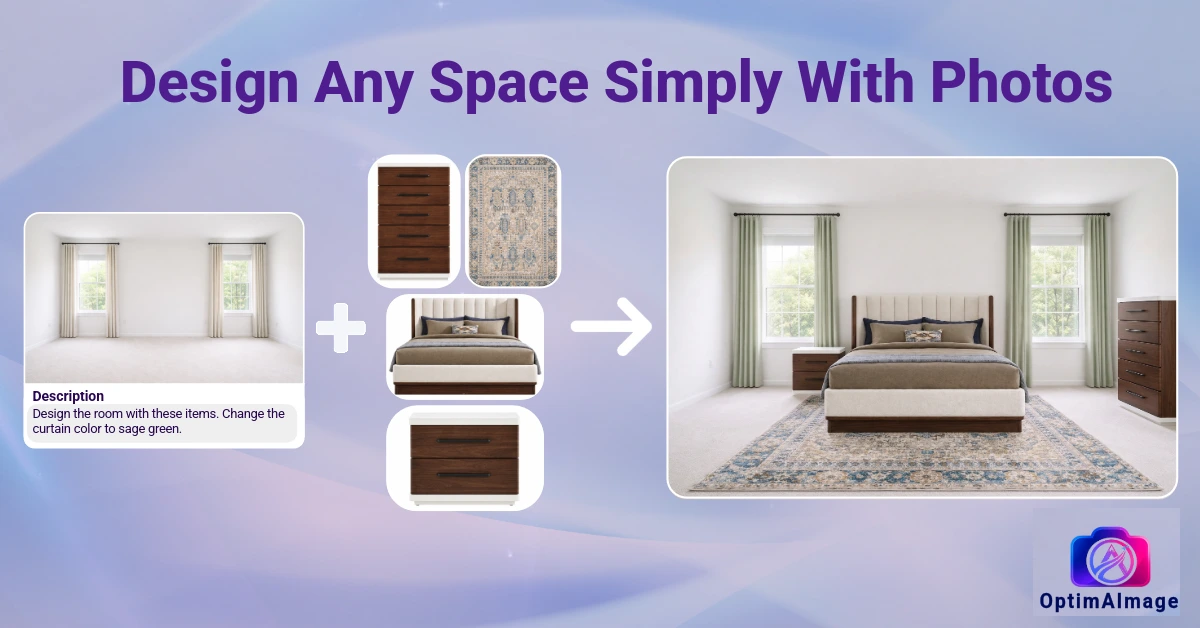
A purpose-built AI interior design app works from your photo. Your room is the anchor. The walls don't move. The window doesn't migrate across the room. The ceiling height in the output matches the ceiling height in your photo. Every design change applied on top of your space is calibrated to your space.
That distinction — photo-anchored transformation versus text-to-image generation — is the most important thing to understand when evaluating any AI interior design tool.
Features That Separate Good AI Interior Design Apps from Gimmicks
Photo-based room input — the non-negotiable. If an app doesn't take your actual room photo as the starting point, it's not doing interior design. It's doing interior inspiration, which you can get from Pinterest for free.
Selective editing — the ability to change one element without regenerating the entire room. Want to swap just the countertop? Or test three different rug options without rebuilding the full room? A good AI home design tool lets you draw on the specific area you want to change and leave everything else untouched.
Multiple style outputs — a single result is rarely enough to make a confident decision. The best AI interior design software generates multiple options from the same photo and description so you can compare directions before committing to one.
Multi-model architecture — different AI models handle different visual challenges. Some excel at photorealistic lighting; others at furniture detail; others at textures and materials. Apps that run prompts through multiple models simultaneously — and surface the best result — consistently outperform single-model tools.
Prompt intelligence — writing an effective AI prompt for interior design is a skill most homeowners don't have. Look for apps that include an AI Agent or prompt optimizer that turns plain-language descriptions ("cozy modern farmhouse vibe") into technically detailed prompts the image models can work with accurately.
History and versioning — interior design is iterative. You'll want to go back to a version from two sessions ago and compare it with your current direction. Apps that maintain a full history of your inputs and outputs support real creative workflows; apps that don't force you to start over every session.
What You Can Redesign with an AI Interior Design App
The scope of a good AI interior design app covers everything that makes a room feel like it was meant:
- Complete style overhauls — from traditional to contemporary, from builder-grade to designer, from cluttered to curated
- Furniture placement and selection — see how specific pieces look in your actual room before ordering; check scale and proportion with your real dimensions
- Paint colors and wall treatments — test colors across full wall surfaces in your actual lighting, not on a 2-inch chip
- Flooring materials — hardwood, tile, carpet, LVP; swap and compare on your actual floor plan
- Lighting changes — fixtures, lamps, and natural light emphasis all change how a room reads; visualize them first
- Kitchen and bathroom renovations — cabinet finishes, countertop materials, backsplash tile; the highest-stakes renovation decisions benefit most from visual confirmation
Evaluating AI Interior Design Apps
While you might search for an "interior ai free" option, it's important to understand what you're getting. Free apps often restrict you to generic templates or single-model outputs that don't reflect your actual room.
For real home projects — picking a paint color, testing a furniture arrangement, or previewing a full room renovation — investing in a premium AI interior design software ensures you get high-resolution outputs, multi-model generation, and a workflow anchored to your actual room's dimensions.
When evaluating an app, the test is simple: does it generate a photorealistic render of your actual room from a photo you upload, or does it just offer generic inspiration?
OptimAImage provides premium tools that let you upload a photo, describe a change, and see photorealistic results anchored to your real space. See what's included across all our premium plans on our pricing page.
How to Use an AI Interior Design App Effectively
Start with a clear photo. Daylight is your best friend. The AI models that process your room photo perform best when they have accurate, well-lit color information to work from. Shoot with the curtains open, turn off tungsten bulbs, and get a clean shot of the whole room.
Define the scope before you start. Are you changing one element or reimagining the whole room? Knowing this helps you write better prompts and avoid results that change things you wanted to keep.
Use specific language for style. "Modern" means fifty different things. "Clean-lined modern with warm wood tones, matte black hardware, and no ornamentation" means one thing. The more specific your description, the closer the output will match your actual vision.
Iterate in layers. Start with the biggest change — the style, the color palette, the furniture — and get that right before moving to details. An AI interior design app works best as a layered process: lock in the direction, then refine the details, then use selective editing for fine-tuning.
Save the outputs you like. Good AI interior design software maintains a history, but it's worth noting which results you want to return to. Screenshot or download the renders you like before you generate more, so you don't lose the good ones in the volume.
Getting Started
The best AI interior design apps don't just show you what a room could look like — they show you what your room could look like. That specificity is what makes the difference between inspiration and an actual decision-making tool.
OptimAImage is built around your photo: every output preserves your room's layout, dimensions, and structure while applying exactly the design changes you describe. Upload a photo of any room and see a redesign in under 60 seconds. Check our pricing to find the right plan for your home renovation or interior design project.